Define the who & why
Get alignment on why it’s worth while to run this campaign & get access to resources
.avif)
How to end the year wowing customers and getting the attention of execs.


With budgets becoming more stringent, tech stacks are being slashed, and no tool is safe from rigorous scrutiny. And when a decision maker asks why the company even needs this product, you have to be ready to clearly quantify the impact of your product.
But why wait for that question to be asked? Why wait for that next business review (the one you’re hoping that an executive will attend)? Or even worse, why wait till renewal?
It’s close to the end of the year, aka the season of Spotify Wrapped. Everyone loves to learn more about their music taste and more importantly, what other similar music they uncover.
And there’s no reason why you can’t bring that same joy to your customers. An end of year email is a powerful way to showcase your product’s value in a way that’s highly specific to your individual customers. And a good end of year email is known to get the attention of executives.
This playbook will walk you through the whole process of executing an end of year email campaign, from ideation to the sending to all your customers (big and small).


There’s a concept you’ll see repeated throughout this playbook and it’s key to making your end of year email successful: hyper-personalization.
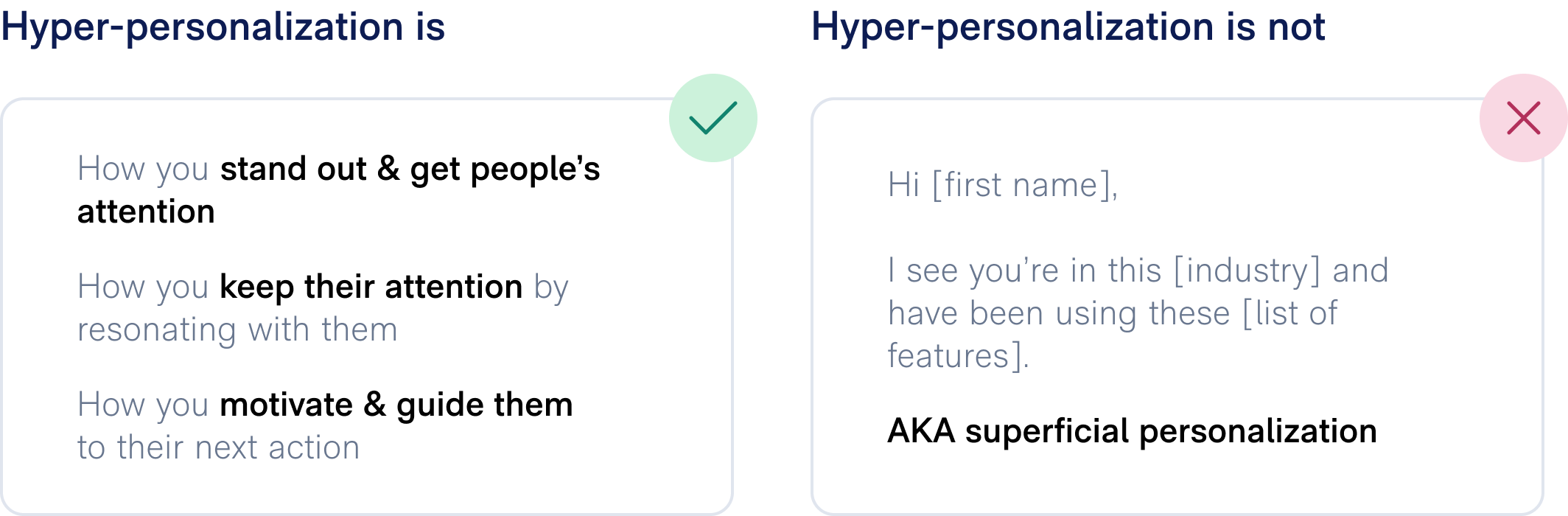
Hyper-personalization is when you customize content beyond just segment-level information, and tailor it based on customer-specific data. In today’s communication-saturated environment, it’s how you make any content you’re sharing with customers standout and keep their attention.
The best way to understand hyper-personalization is to contrast it with superficial personalization, the type we see happening everywhere. For example, when you see an email that goes “Hi [your name], I see you work at [company name]. In [industry], we see a lot of customers use [list of features],” you’re probably not impressed. That’s because you know that they’ve blasted this same email (minus the name) to many others. While there may be a tid-bit or two that you find useful, you’re more likely to hit delete.
And hitting delete is exactly what your customers are doing too.
But how much more impactful is an email that says, “Hi [your name], Your team at[company name] has been using [top feature] a lot and been seeing [ROI value] from it.Based on your goal of [business outcome], we recommend also using [specific feature].Happy to [specific next step] to help your team.”
Hyper-personalization, it does the customer good.

Creating an end of year email consists of four major steps. Now before you think that we are oversimplifying, don’t worry we are not. There’s definitely a lot happening in each step, and we’ll dive into the specifics.

Get alignment on why it’s worth while to run this campaign & get access to resources

Bridge the gap between the ideal and what is actually possible

Make it happen!

Learn & take it to the next level

Get alignment on why it's worthwhile to run this campaign and get access to resources.
All good emails (and content) start with the customer in mind. It’s easy to fall into the trap of thinking this email is for your company. But the goal here is to make sure that the customer is getting value from it (which isn’t at odds with your company getting value from sending it).
As you’re thinking through this, you’ll want to consider the various segments.
Woah, segments - doesn’t that go against hyper-personalization? Only if you stop there. Think of segments as the first step to hyper-personalization. By defining the segments, you’ll have an initial idea of how the emails may vary.
Potential segmentation:
This step will help you clearly define the value of the email to the customer. For each segment, answer these two questions:
Defining success will help you identify your north star for this email campaign, and give you a structure for making decisions. And there’s a lot of decisions that will need to be made. Make sure to think both tactical and strategic.
These are metrics that are around general email performance. They’re important to keep an eye on to understand if the email “worked.”
These are the metrics that will help you get buy-in company-wide to do this email, and ultimately help you decide if you should do it again next year. An end of year email requires a lot of lift from a different departments, so make sure you’re always coming back to what will move the needle for the company. Check out examples of strategy metrics below.
End of year emails are notorious for requiring a lot of help from many departments. So, how do you get buy-in? By leveraging the success metrics and providing an estimated impact, you’ll be able to inform prioritization and how much resources to lend to the email. Specifically, you’ll want to lean on the strategic metrics (because no one cares about how many people opened an email). End of year emails have the added benefit of providing a fun, rallying point for a company. So for those who haven’t yet run a hyper-personalized campaign like this before, it can be a great starting point.
Help determine segmentation and recommended next steps
Help inform email strategy and content
Help make the email easy to understand visually and eye-catching
Help implement personalization and bringing the data into the email
Help figure out what data should be used in the email

Bridge the gap between the ideal and what is actually possible
Let’s be clear, what you dream of in this step is not what you’ll end up sending. But you’ve got to start somewhere! Here are things to keep in mind:
Revisit your answers in the “Figure out the why for them” step to determine what you need to include in the email. And ALWAYS tie it back to THEIR business outcomes.
Content like business review decks, renewal decks and ROI analyses are a good jumping off point for understanding what data is already available.

Using very simple data can lead to a “well, duh” moment instead of a “oh, wow” one. A good framework for thinking about what data you want to share is Matik’s Hierarchy of Data (similar to Maslow’s Hierarchy of Needs). At the bottom is your account data, which is straightforward information like what is included in the contract. Usage data is much better than account data and helps the customer understand that they are getting something out of your product. But ROI, the most transcendent of data, is what helps you customer connect the dots regarding why your product is critical to their business.
Showing customers the ROI they’re getting today is cool, but showing customers the additional ROI they could be getting if they did X and Y makes you a trusted advisor to them. Guide them to what more they should be doing with your product (even if it means they need to pay more) by showing them how it can impact their business.
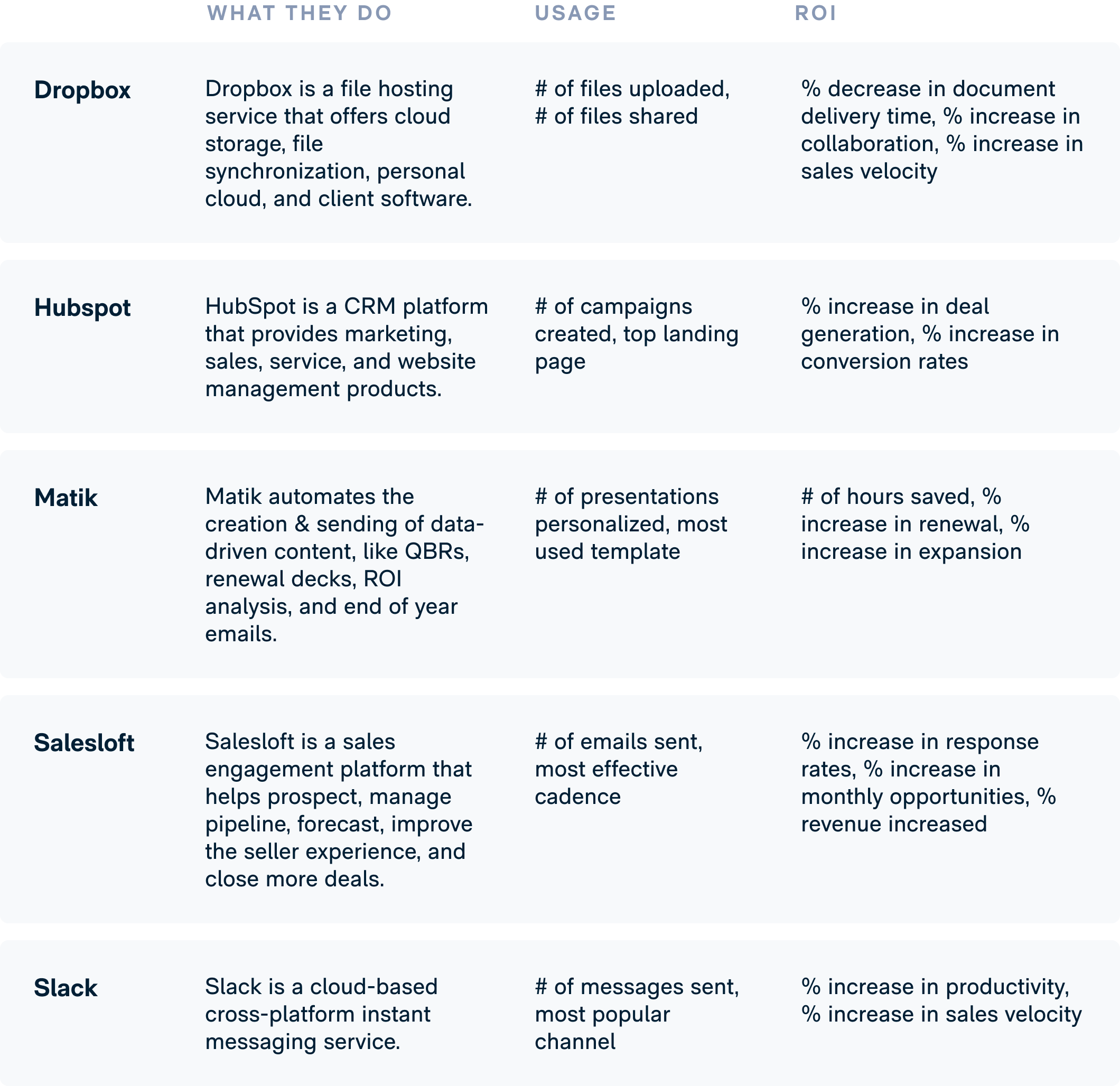
Figuring out which metrics to highlight can be one of the more difficult aspects of creating an end of year email. How do you create something compelling. Below are examples of what a few B2B tech companies might use in their end of year emails.
Expect this to be a collaborative process with all of the stakeholders. There will be a lot of back and forth, and that’s a good thing!
Ensure a smooth process by:
Try this...Subject line: Create an eye-catching subject line that is clear and understandable; verbs and action-oriented language can create excitementPreview text: Leverage preview text to further entice the recipient to open the emailFrom line: Send emails from a real person versus a generic company email
Try this...Hyper-personalization: Include data & recommendations personalized to that specific customerCall-to-action: Create a compelling call-to-action & minimize the number of CTAs in the emailEmail design: Use a clear, uncluttered design with easily clickable buttons or linksConcise copy: Make it easy for a recipient to easily scan the email
Try this...Hyper-personalization: Include data & recommendations personalized to that specific customer
Try this...Unsubscribe: Make it easy to unsubscribe
Try this...Email list: Clean up your email list, including removing deactivated users
Can't agree on something or unsure if it will work? Then A/B test!
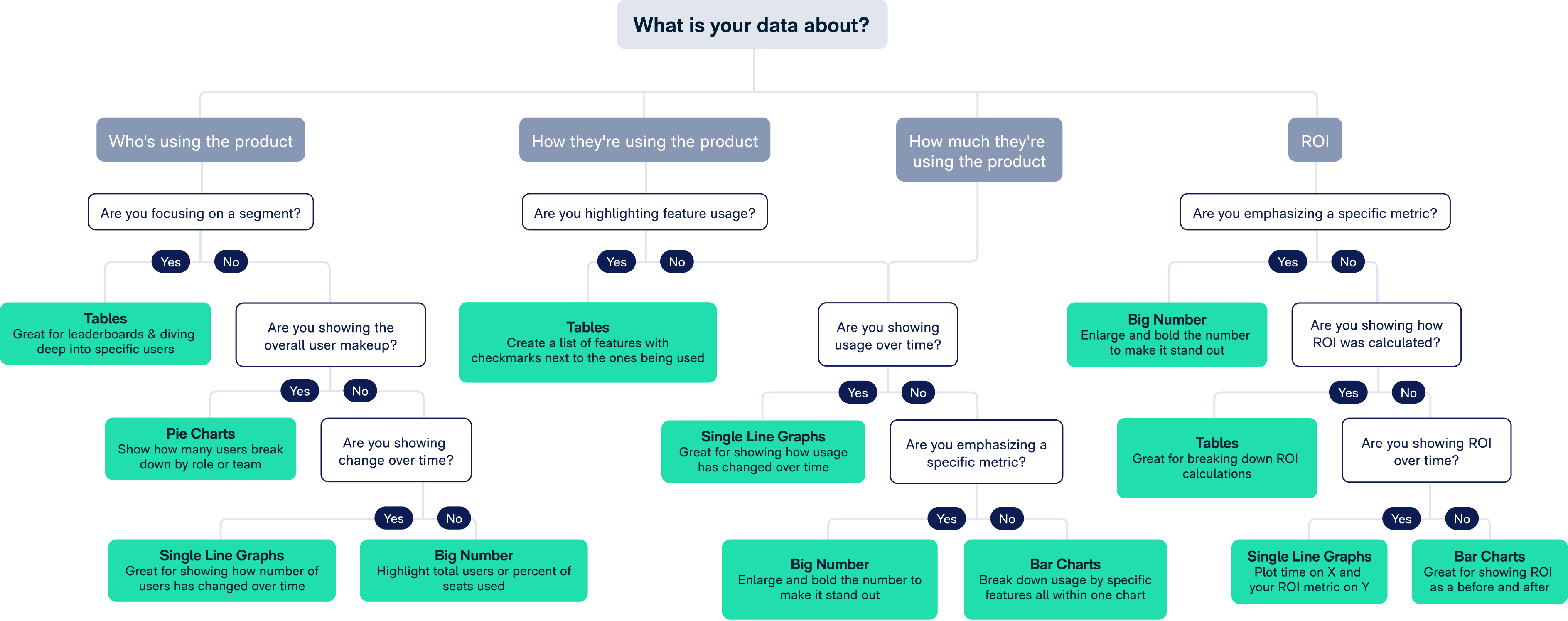
While not a standard email best practice, if you plan on including a data visualization like a table or a chart, then it's important you pick the right. The wrong data visualization can lead to more confusion, and instead of customers getting excited, it'll lead to aggravation. Use the below flow chart to determine which data visualization is the best for what you're trying to communicate.

Make it happen!
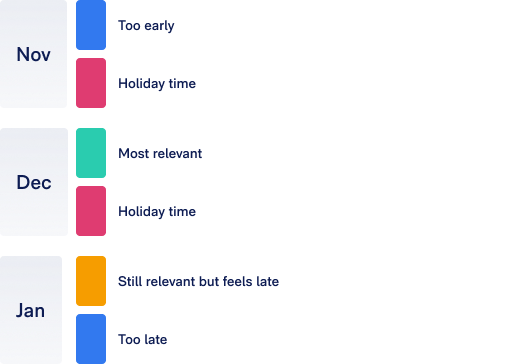
Timing is everything for an end of year email. Once you decide your send date, make sure to create a workback plan from that date so you know what milestones you need to hit and when.
This is arguably one of the most challenging parts of creating and sending an end of year email. But since the data is the heart of the email, it’s a step you can’t afford to skip.
Data at most companies lives in a lot of different places. Once you’ve determined what metrics you want in the “Creating the Email Content” step, you need to have an understanding of where it might exist.
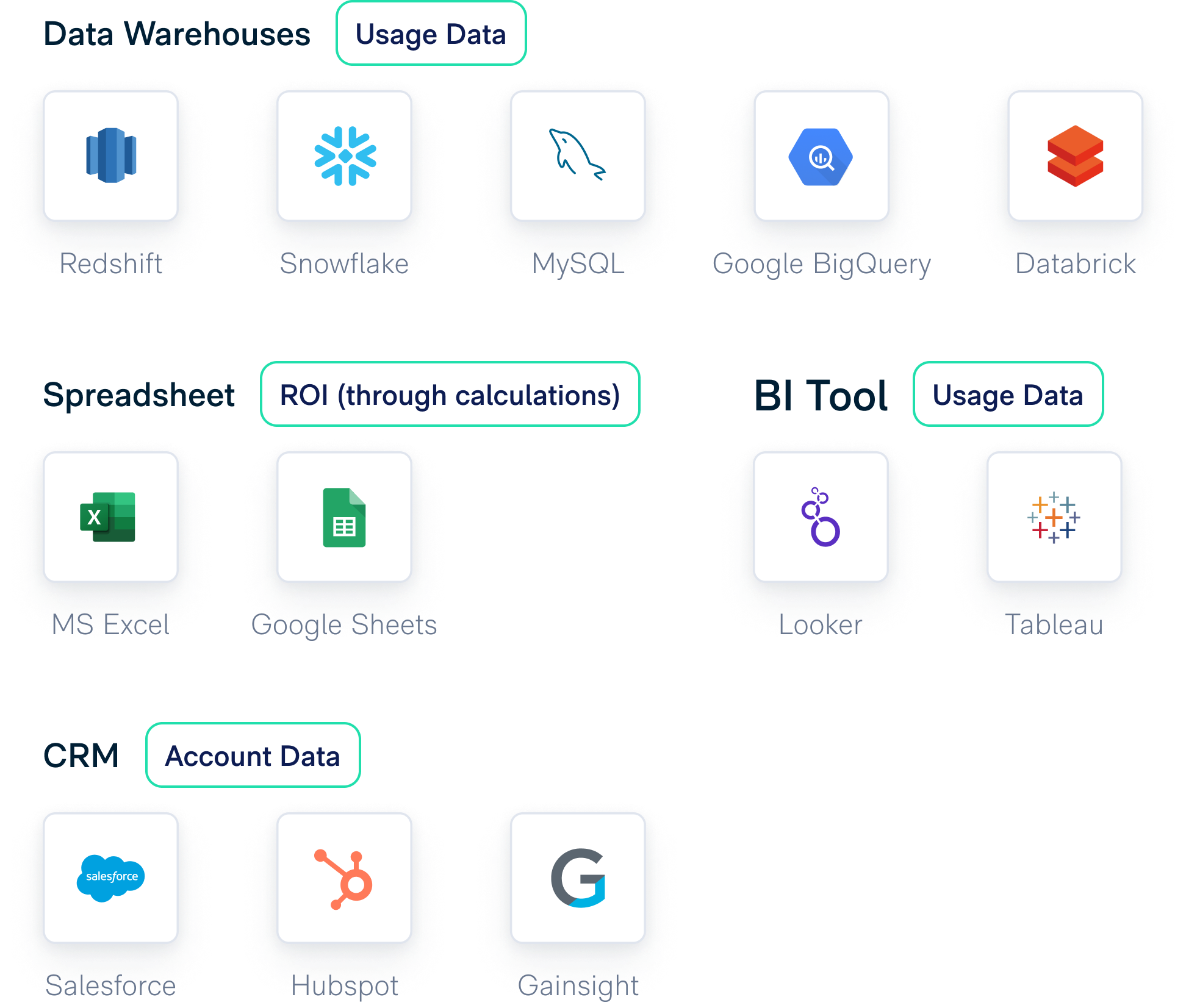
You’ll want to consider the following as you determine parameters for the data:
Before using the data in the email, make sure to do a spot check with your customer success managers (CSMs):
If data does not reflect well, that's not a bad thing! This is when recommendations are more important than ever and can help turn things around.
Now that you’re data is ready, it’s time to prep the email. Here’s what to consider:
Generally you’ll have two options: bulk upload and syncing.
Regardless of which method you choose, you will still need to set up fields in the CRM for each data field you upload, which you will then add to the email as a merge tag.
Merge tags are placeholders (aka variables) that you’ll type into the email to let the platform know where it should insert the field value for a customer.
The goal here is to optimize for engagement. Use previous email sends to optimize for engagement.
If your designer is HTML savvy, then lean on them to convert the email design into the platform. If not, there are many vendors who’ll convert your email design to HTML for a reasonable fee. You would then take the file they created and upload it to the email platform.
Bonus ways to make your email stand out:
All those success metrics you defined in the “Define the Who & Why” step - make sure you can actually track them!
This is standard in all email platforms, so nothing to check here.
Many companies using a tool specifically for product analytics. Check with your product or engineering team that the features you are recommending are being tracked correctly.
Some product analytics platforms will integrate with your email platform so that you can pull email, send and open data into the product analytics platform. This will make it even easier to track the impact of the email, since you’ll be able to create a funnel of both the email and product events. If this is not an option, you will manually have to pull the data from each platform and combine in a spreadsheet for analysis.
While the renewal date may be far off, you’ll want to make sure that your CRM tracks which contacts are receiving this email. This can be done through activity records or as a campaign. That way, when you are trying to figure out if you should send another end of year email, you can see how many opportunities were influenced by it.
Most people think when it comes to the testing change, you really can’t make changes. That’s not true - in fact, these might be some of your most critical changes.
Customer success managers. Not only do you want to run a technical email test with them, to make sure everything is coming through correctly, but you’ll also want to get feedback on the content.
Hear directly from the people you want to engage, and ge their thoughts on the content you are planning to send.
Ideally you aren’t building this content in a vacuum and are looping these two groups in from the beginning. But if you haven’t, it’s never too late to get their feedback and incorporate it.
Before you send the email, make sure that both your customer success and sales teams are prepared. This includes:

Learn and take it to the next level
Now that you’ve sent the email, it’s time to determine if it worked! Consider these questions when deciding if your email was a success:
Remember: Even if the email isn’t wildly successful, you can take the learnings to make the next campaign much better!
Now that you know what works & what doesn’t, the next step is determining what to do next. The big question to answer is how often do you want to send a campaign like this that showcases your product’s ROI and recommendations for getting more out of it?
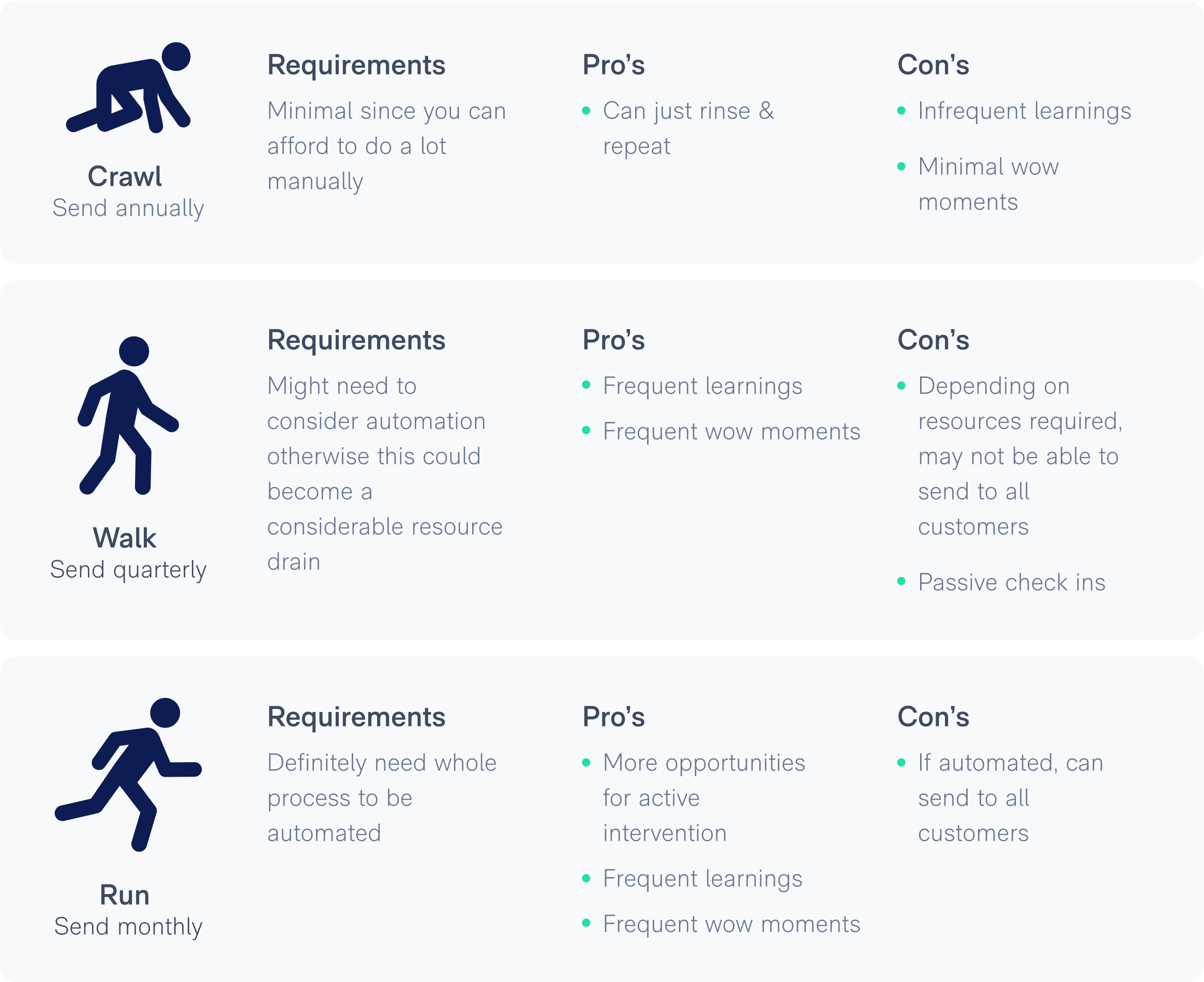

Don't miss a step. Download The Checklist to use with your End of Year Email.

There's no reason to start from scratch when you can use AI to give you an initial stab. And don't worry, it's free.

It gives you everything other email platforms offer AND...